

Your website is not just a digital brochure. It's a sales tool, a trust signal, and often the first impression a potential customer gets of your business. Understanding what is a website redesign, and what it actually involves, is the difference between spending money on something cosmetic and making a real investment in your business growth. Most small business owners assume a redesign means picking new colors and fonts. It's much more than that, and getting it right requires a clear strategy from the start.
Table of Contents
- Key takeaways
- What a website redesign actually involves
- Signs your website needs a redesign
- Planning a website redesign strategy that works
- Common pitfalls that derail redesigns
- Practical next steps for small business owners
- My take on redesigns vs. continuous improvement
- Ready to redesign your website?
- FAQ
Key takeaways
| Point | Details |
|---|---|
| Redesign goes beyond visuals | A website redesign covers structure, content, UX, and functionality, not just aesthetics. |
| Timing matters | Most sites benefit from a full redesign every 3 to 5 years to stay competitive and functional. |
| SEO must be protected | Failing to set up proper redirects can cost you up to 50% of organic traffic within 90 days. |
| Content comes first | Finalizing your content before design begins prevents costly layout rework later. |
| Iterative beats big bang | Small, data-guided improvements over time are safer and more effective than periodic overhauls. |
What a website redesign actually involves
A website redesign is a comprehensive overhaul of your site's structure, content, user experience, visual design, and underlying technology. It is not a coat of fresh paint. When done properly, every layer of your site gets evaluated and improved with specific business goals in mind.
What does website redesign involve at the component level? Here's what typically changes:
- Site architecture: How pages are organized, how users move between them, and how search engines crawl the site.
- Content: Messaging, page copy, calls to action, and whether the content actually serves your audience's needs.
- User experience (UX): How easy it is for visitors to find what they need and take action.
- Visual design: Brand alignment, typography, color, imagery, and layout.
- Functionality: Forms, integrations, e-commerce features, booking tools, or anything your site needs to do.
- Technology: The platform or CMS your site runs on, hosting, and page speed infrastructure.
It's worth distinguishing a redesign from a refresh. A website refresh targets minor visual changes without altering structure or content. Think updating a logo or swapping out photos. A redesign is a structural and strategic overhaul. Knowing which one you need saves time and money.
One principle that separates successful redesigns from expensive failures: content should come before design. Designing before content is finalized often causes misaligned layouts and rework. If you hand a designer a blank template and say "we'll fill in the words later," you will almost certainly redo that work. Get your messaging locked down first.
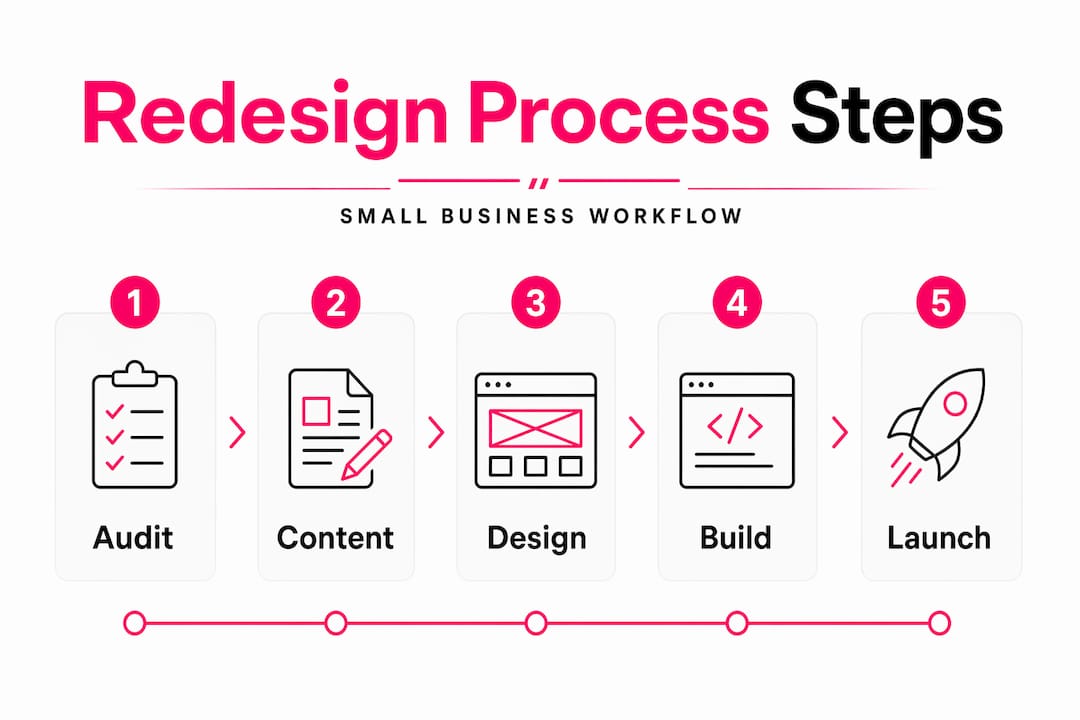
Pro Tip: Before you brief any designer or developer, write out the purpose of every page on your site. What action should a visitor take? What question does this page answer? That clarity shapes every design decision that follows.
Signs your website needs a redesign
Recognizing the right moment to redesign is as important as knowing how to do it. Many small business owners either wait too long or pull the trigger too early, both of which waste resources.
Common signs your website needs a redesign include:
- Outdated design: If your site looks like it was built in 2014, visitors notice. Design trends signal credibility and professionalism.
- Poor mobile experience: Over half of web traffic comes from mobile devices. A site that doesn't adapt to smaller screens loses customers immediately.
- Slow load times: Page speed directly affects both user experience and search rankings. Slow sites drive people away.
- Declining organic traffic: If your SEO performance is dropping without a clear cause, your site's structure or content may be the issue.
- Low conversion rates: Visitors arrive but don't contact you, buy, or book. That's a UX or messaging problem, not a traffic problem.
- Brand mismatch: Your business has evolved but your website still reflects who you were three years ago.
On timing, the data is clear. A full redesign every 3 to 5 years is the recommended cycle. Redesigning more frequently than that rarely produces meaningful ROI. The exception is when something fundamental breaks, like a platform becoming obsolete or a major rebrand.
The importance of website updates between redesigns should not be underestimated either. Regular maintenance, fresh content, and incremental improvements keep your site healthy without the disruption of a full overhaul. Ongoing maintenance and small updates prevent the kind of technical debt that eventually forces a costly, rushed redesign.

Planning a website redesign strategy that works
A website redesign without a strategy is just spending money on something new. The website redesign process for small businesses should follow a clear sequence of decisions before any creative work begins.
Here's how to approach it:
- Define your business objectives. What specific problem is the redesign solving? More leads, better brand perception, faster load times, higher conversions? Name the metric you want to move.
- Audit your current site. Review analytics, identify your best-performing pages, and document what's working. You don't want to accidentally remove something that drives traffic.
- Conduct user research. Talk to actual customers. Ask what confuses them, what they were looking for, and whether they found it. This data is more valuable than any design trend.
- Set your scope. Decide whether you need a full redesign or whether iterative improvements to specific pages would solve the problem more efficiently.
- Plan your URL structure and redirects. This step is non-negotiable. Failing to implement proper redirects can cause 20 to 50% organic search traffic loss within three months. Map every old URL to its new destination before launch.
- Finalize content before design. Lock in your copy, headlines, and calls to action. Then design around the content.
- Align your team. Make sure whoever handles design, development, and content is working from the same brief. Misaligned stakeholders are the number one cause of scope creep and delays.
Website redesign best practices also include setting measurable success criteria before launch. Decide in advance what "success" looks like at 30, 60, and 90 days post-launch. That keeps everyone accountable and gives you data to evaluate the investment.
Pro Tip: Run a heatmap tool on your current site for at least two weeks before you redesign. Tools like Hotjar or Microsoft Clarity show you exactly where people click, scroll, and drop off. That data tells you what to fix and what to keep.
Common pitfalls that derail redesigns
Even well-intentioned redesigns go wrong. Understanding where they fail helps you avoid the same mistakes.
- Redesigning without data. Many redesigns reduce usability if they are driven by aesthetic preferences rather than actual user behavior and business data. A new look that confuses your existing customers is not an improvement.
- Ignoring SEO during the build. Changing URLs, removing pages, or restructuring navigation without an SEO plan can wipe out years of search ranking progress.
- Disrupting familiar navigation. If your users already know how to find things on your site, changing the navigation structure without a strong reason creates friction. Familiarity has real value.
- Skipping the testing phase. Launching without testing on multiple devices and browsers is a gamble. Broken forms, misaligned layouts, or slow load times on mobile can immediately undermine the investment.
- Treating launch as the finish line. A redesign is not done when the site goes live. The first 90 days post-launch require close monitoring of traffic, conversions, and user behavior.
"Leadership often favors dramatic website overhauls for visibility, but data supports incremental improvements as safer and more effective." This is one of the most consistent patterns in failed redesign projects.
The alternative worth considering is the iterative model. Rather than a full overhaul every few years, you make small, measurable improvements continuously. Update the homepage messaging. Improve the contact form. Speed up the service pages. Each change is tested and measured. The result is a site that improves constantly without the disruption of a big-bang launch.
Practical next steps for small business owners
Knowing how to redesign a website starts with an honest assessment of where you stand today. Before you contact a designer or agency, work through these questions:
- Do you have the internal skills to manage a redesign, or do you need outside help?
- What is your realistic budget? For small to mid-sized businesses, redesign costs range from $5,000 to $75,000 depending on complexity.
- How much time can you commit? Small websites typically take 2 to 3 months to redesign; medium sites take 3 to 6 months.
- Do you have someone who can own the content process internally?
- What does your post-launch maintenance plan look like?
The benefits of website redesign are real when the project is planned and executed well. Better brand alignment, improved user engagement, and stronger SEO performance are all achievable outcomes. But they require clear goals, the right team, and a process that doesn't skip the foundational steps.
A continuous improvement mindset after launch is what separates sites that stay strong from sites that need another full overhaul in two years. Treat your website like a product, not a project with a finish line.
My take on redesigns vs. continuous improvement
I've worked on enough website projects to have a strong opinion on this: the "big redesign every few years" model is overrated for most small businesses.
Here's what I've seen repeatedly. A business spends months and significant budget on a full redesign. The new site launches, looks great, and gets a round of applause internally. Then six months later, traffic is flat, conversions haven't moved, and the team isn't sure why. The problem was that the redesign was driven by wanting something new rather than solving a defined problem.
What I've found actually works is treating your website like a living product. You identify one specific issue, fix it, measure the result, and move to the next. This approach preserves your SEO equity, keeps your users familiar with your navigation, and gives you real data on what's working. It's less exciting than a big launch, but it consistently outperforms the periodic overhaul model.
The one time a full redesign makes clear sense is when the underlying technology is genuinely broken or outdated, or when a business has fundamentally changed what it does and who it serves. In those cases, starting fresh is the right call. But for most small businesses, the answer is usually "improve what you have" rather than "rebuild from scratch."
— Annie
Ready to redesign your website?
If you've been putting off a website update because it felt overwhelming, you're not alone. Most small business owners don't know where to start, and that's exactly where professional help pays for itself.
At Glimmertech, website redesign projects are built around your business goals, not just aesthetics. The process covers UX, content strategy, technical SEO, and design together, so nothing falls through the cracks. Whether you need a full rebuild or a focused set of improvements, the work is scoped to what actually moves the needle for your business. If you're ready to make your site work harder, explore website services at Glimmertech and see what a strategic approach looks like in practice.
FAQ
What is a website redesign?
A website redesign is a comprehensive overhaul of a site's structure, content, user experience, and visual design. It goes beyond cosmetic changes to address how the site functions and performs for both users and search engines.
How often should a small business redesign its website?
Most experts recommend a full redesign every 3 to 5 years. Redesigning more frequently often delivers limited return on investment unless a major business change or technical issue requires it.
What are the biggest risks of a website redesign?
The most common risks are losing organic search traffic due to poor redirect planning, disrupting user navigation, and launching without testing. Proper planning and a clear SEO strategy before launch prevent most of these issues.
How long does a website redesign take?
Small websites typically take 2 to 3 months, while medium-sized sites take 3 to 6 months. Timeline depends on the scope of work, content readiness, and how quickly decisions get made during the process.
What is the difference between a website redesign and a website refresh?
A refresh involves minor visual updates like new photos or updated fonts without changing the site's structure. A redesign is a full overhaul that addresses architecture, content, UX, and functionality with specific business goals in mind.