

Slow websites lose customers. If your pages take more than three seconds to load, a significant portion of your visitors leave before they see anything. Understanding what is image optimization web means understanding the single biggest lever you have over your site's speed. Images account for over 70% of page weight on the average website, and most of that weight is completely avoidable. This guide covers exactly what image optimization is, which techniques matter most, and how to put them to work today.
Table of Contents
- Key takeaways
- What is image optimization for web
- Modern image optimization techniques
- How to compress, name, and mark up images for SEO
- Tools and workflows for ongoing optimization
- My take on what most people get wrong
- Let Glimmer Tech handle your image optimization
- FAQ
Key takeaways
| Point | Details |
|---|---|
| Images dominate page weight | Images make up 70%+ of average page size, making them the first place to target for speed gains. |
| Format choice changes everything | Switching to WebP or AVIF can reduce file sizes by 60–80% compared to JPEG or PNG. |
| SEO depends on image markup | Alt text, file names, and structured data turn images into searchable, rankable assets. |
| Lazy loading has limits | Never lazy load your hero or LCP image. Deferring it hurts your Core Web Vitals scores. |
| Optimize before upload | Pre-upload compression outperforms any plugin applied after the fact. |
What is image optimization for web
Image optimization for web is the process of reducing image file sizes while preserving enough visual quality to satisfy users. It covers four core decisions: file format, dimensions, compression level, and delivery method. Get all four right, and your pages load faster, rank better, and convert more visitors.

The connection to SEO is direct. Google's Core Web Vitals measure Largest Contentful Paint (LCP) and Cumulative Layout Shift (CLS). Both are heavily influenced by how images are handled. A bloated hero image delays LCP. An image without explicit width and height attributes causes layout shift as the page renders. Setting explicit width and height on every image prevents those layout shifts and improves your CLS score in one step.
The business case is equally clear. A 1-second delay in page load correlates with a 7% drop in e-commerce conversions. For a store doing $10,000 a month, that is $700 left on the table from a single slow second. The benefits of image optimization reach every metric that matters: bounce rate, time on site, conversion rate, and organic ranking.
"Images are not just decoration. They are performance infrastructure. Treat them like code."
Modern image optimization techniques
The biggest single upgrade you can make right now is switching to a next-generation format. WebP and AVIF both outperform JPEG and PNG significantly. Converting to WebP or AVIF can reduce page weight by 60–80% and cut Largest Contentful Paint times by more than two seconds. Browser support for both formats is now near-universal, so there is no longer a reason to serve PNG by default.
Beyond format, these techniques deliver the most practical value:
- Responsive images with srcset and sizes. The "srcset
attribute tells the browser which image file to use at which display width. Combined withsizes`, this means a phone user downloads a 400px image instead of a 1600px one. Responsive image delivery can reduce unnecessary mobile downloads by 50–70%. - Lazy loading for offscreen images. Adding
loading="lazy"to any image below the fold defers its download until the user scrolls toward it. This speeds up initial render considerably. The critical rule: do not lazy load above-the-fold images. Doing so forces the browser to delay your LCP element. - Preloading the LCP image. Your hero image is the most performance-sensitive asset on the page. Adding a
<link rel="preload">tag withfetchpriority="high"tells the browser to fetch it immediately. Preloading the LCP image can reduce LCP scores by 200–500 milliseconds. - Image CDNs for automatic delivery. Services like Cloudflare Images or Imgix let you upload one high-resolution source file. The CDN then generates optimized variants automatically based on device type, browser, and network conditions.
Pro Tip: The combination of next-gen formats, responsive images, lazy loading, and a CDN can reduce image bandwidth by up to 80% without any visible quality loss. You do not need to do everything at once. Start with format conversion and srcset, then layer in the rest.
How to compress, name, and mark up images for SEO
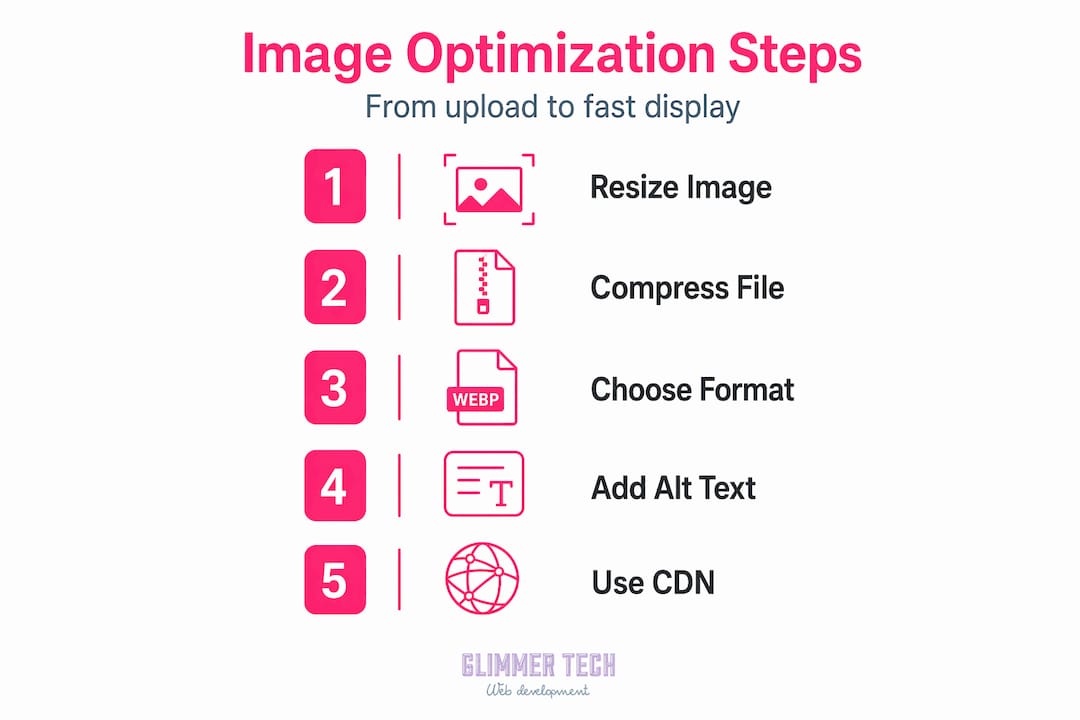
Compression is where most people make mistakes. They either compress too hard and get visibly degraded images, or they skip compression entirely. The practical target for WebP is a quality setting of 80–85%. Quality settings above 90% show diminishing returns on file size, while anything below 70% introduces visible artifacting. That 80–85% range is the sweet spot. Aim to keep each image asset under 100KB where possible.
Here is a straightforward process for optimizing images before they go anywhere near your CMS:
- Resize to actual display size. If an image displays at 800px wide, export it at 800px. Uploading a 3000px photo and shrinking it with CSS is wasteful.
- Convert to WebP. Use a tool like Squoosh, Sharp, or your build pipeline. Set quality to 80–85%.
- Name the file with hyphens. Hyphens in image filenames help search engines read your keywords correctly. A filename like
red-running-shoes-womens.webpis far more indexable thanIMG_4821.webp. - Write descriptive alt text. Alt text serves two purposes: screen reader accessibility and keyword signaling to search engines. Keep it concise, specific, and relevant to the page context.
- Add structured data. Embedding Schema.org image markup and IPTC metadata improves image indexability and increases the chance of appearing in rich results.
Pro Tip: Pre-upload compression gives you the best ranking and performance results. Plugins that compress after upload work, but they process images reactively and often miss edge cases. Build compression into your workflow before anything reaches the server.
The table below shows how common image file formats compare for web use:
| Format | Best use case | Compression | Browser support |
|---|---|---|---|
| JPEG | Photos without transparency | Lossy, moderate | Universal |
| PNG | Graphics needing transparency | Lossless, large | Universal |
| WebP | Most web images | Lossy/lossless, small | Near-universal |
| AVIF | High-quality photos, future-proof | Lossy, very small | Growing rapidly |
| SVG | Icons, logos, simple illustrations | Vector, no raster loss | Universal |
Tools and workflows for ongoing optimization
The best optimization strategy is one that runs automatically. For WordPress users, plugins like ShortPixel, Imagify, and EWWW Image Optimizer handle format conversion and compression within the CMS. They are not a substitute for pre-upload optimization, but they catch anything that slips through.
For developers working with build tools, Sharp is a Node.js image processing library that integrates with Vite, webpack, and similar pipelines. You can configure it to convert all images to WebP at build time, generate srcset variants automatically, and compress everything to your target quality level. This is the most reliable way to maintain consistent optimization across a large project.
For manual, one-off work, Google's Squoosh is a browser-based tool that lets you compare formats and quality settings side by side before downloading. It is especially useful for checking whether a specific image looks acceptable at a given compression level.
Whichever tools you use, audit your existing images periodically. Run a Lighthouse or PageSpeed Insights report and check the "Properly size images" and "Serve images in next-gen formats" suggestions. Monitor your Core Web Vitals in Google Search Console after making changes. These two checks together tell you whether your optimization work is actually moving the needle.
My take on what most people get wrong
I have seen hundreds of websites where images were treated as an afterthought. The business owner spent months on branding and copy, then uploaded a 4MB JPEG hero image and wondered why conversions were flat. That is the most common version of this mistake, and it is entirely preventable.
What surprises me most is how often responsive images get skipped. Developers know about srcset. They just do not implement it consistently because it adds a bit of work at the content creation stage. The result is that mobile users, who now account for the majority of web traffic, download desktop-sized images on every page load.
My strongest recommendation: treat your hero image as a first-class SEO asset. It should be WebP format, preloaded with fetchpriority="high", sized with explicit width and height attributes, and marked up with Schema.org. That combination alone can move your LCP score from poor to good. I have watched it happen on sites where nothing else changed.
Next-gen formats are no longer optional. In 2026, serving JPEG as your default image format is the equivalent of not having a mobile-friendly site in 2018. The tools exist, the browser support is there, and the performance gains are real. The only reason not to switch is inertia.
— Annie
Let Glimmer Tech handle your image optimization

At Glimmer Tech, performance is built into every project from day one, not added later. That means WebP conversion, responsive image markup, LCP preloading, and CDN delivery are standard in every build, not extras you have to ask for. If your current site is dragging because of unoptimized images, a focused audit can identify exactly where you are losing speed and search visibility. Small businesses deserve sites that load fast, rank well, and convert visitors into customers. That is what Glimmer Tech builds.
FAQ
What does image optimization for web actually mean?
Image optimization for web means reducing image file sizes through format selection, compression, and proper sizing without sacrificing visual quality. The goal is faster load times, better Core Web Vitals scores, and improved SEO rankings.
What is the best image format for web performance?
WebP is currently the best all-around choice for most web images, offering 60–80% smaller file sizes than JPEG or PNG at comparable quality. AVIF performs even better for photographic content but has slightly less browser coverage.
How does image compression affect SEO?
Faster-loading images improve Core Web Vitals metrics like LCP and CLS, which are direct Google ranking signals. Descriptive alt text and structured data markup further help search engines index your images and surface them in relevant results.
Should I lazy load every image on my page?
No. Lazy loading is effective for images below the fold, but you should never apply it to your above-the-fold or LCP image. Lazy loading your hero image forces the browser to delay loading it, which hurts your LCP score and search performance.
How small should web images be?
Aim to keep individual web images under 100KB where possible, using WebP at 80–85% quality. Large hero images may legitimately exceed this, but anything over 200KB should be reviewed carefully before publishing.