
You published your website. You wrote the pages, added the photos, and hit "launch." But when you search for your business on Google, nothing shows up. The problem is almost always indexing. What does website indexing mean, exactly? It means whether Google has read, understood, and stored your page in its database so it can serve it as a search result. If your page is not indexed, it does not exist in search. This article breaks down the website indexing process from crawling to content quality, and shows you how to fix the gaps holding your site back.
Table of Contents
- Key Takeaways
- What website indexing means, explained simply
- Why some pages get crawled but never indexed
- Practical steps to improve your indexing
- Indexing in 2026: AI, quality signals, and what changed
- My take on indexing and small business SEO
- How Glimmer Tech can help your site get found
- FAQ
Key Takeaways
| Point | Details |
|---|---|
| Indexing determines visibility | A page must be indexed by Google before it can ever appear in search results. |
| Crawling and indexing are different | Google crawls to discover pages, but indexing is a separate decision based on content quality. |
| Content quality drives indexing | Thin, duplicate, or AI-generated content is a leading reason pages are crawled but never indexed. |
| Technical setup matters too | Sitemaps, internal links, and mobile-friendly formatting all signal to Google which pages to prioritize. |
| Not all unindexed pages are a problem | Some pages are intentionally excluded from indexing, and that is normal and correct SEO practice. |
What website indexing means, explained simply
Think of Google as a librarian managing the world's largest library. Before a book can be checked out, it has to be cataloged. Website indexing is that cataloging process. When Google indexes a page, it is saying: "We read this, we understand what it is about, and we are storing it so we can show it when someone searches for something relevant."
The website indexing process involves crawling, parsing, normalization, storage, and retrieval with ranking algorithms that combine keyword and semantic relevance. That is a lot of steps, and each one can go wrong. Here is how the full sequence works:
- Discovery. Google finds your URL through a link from another page, a submitted sitemap, or a previous crawl.
- Crawling. Googlebot visits your page and downloads its content, including text, images, and code.
- Parsing. Google reads your page and tries to understand what it is about, how it is structured, and what it links to.
- Indexing decision. Google decides whether the page is worth storing. This is where quality thresholds come in.
- Storage and ranking. If accepted, the page is added to Google's index and made available to appear in search results based on relevance and authority.
There are also a few common indexing statuses you will see in Google Search Console:
- Indexed. Your page passed. It is in Google's database and eligible to rank.
- Crawled, currently not indexed. Google visited your page but chose not to add it to the index.
- Noindex. Your page has a tag telling Google not to index it, either intentionally or by mistake.
Pro Tip: Check Google Search Console regularly. The "Pages" report under Indexing shows exactly which pages are indexed and which are not, with reasons.
Why some pages get crawled but never indexed
This is the situation that frustrates most small business owners. You can see Google is visiting your pages, but they are not showing up in search. The answer is almost always content quality.

Google's indexing decision is a conscious choice. A "crawled, currently not indexed" status means the algorithm analyzed your content and decided it did not meet the bar for usefulness or originality compared to other indexed pages. This is not a technical error. It is a content verdict.
Here are the most common reasons it happens:
- Thin content. Pages with very little text or value, like a contact page with just a form and a phone number, often do not get indexed on their own.
- Duplicate content. If you have multiple pages with nearly identical text, Google will typically index only one and ignore the others.
- AI-generated or repetitive content. Google indexes fewer crawled URLs today compared to a decade ago, largely because of the sheer volume of low-value AI-generated content flooding the web.
- Poor internal linking. If no other page on your site links to a given page, Google may treat it as low priority and skip it.
- Low trustworthiness signals. New sites with no backlinks or engagement history take longer to earn indexing trust.
Site architecture also plays a role. A page buried three or four levels deep in your site structure sends a signal that it is not very important. Internal linking and sitemap submission remain key tactics for helping Google discover and prioritize the right pages. If you have a service page you want ranked, link to it from your homepage. That single change can make a noticeable difference.
Pro Tip: Do not try to index every page on your site. Admin pages, duplicate filter pages, and thank-you pages should often carry a noindex tag intentionally. Focus indexing efforts on pages that have real search value.
Practical steps to improve your indexing
Knowing why indexing fails is half the battle. The other half is fixing it. These actions are practical, direct, and apply to most small business websites.
- Write content with genuine depth. Every service page, product description, and blog post should answer a real question or solve a real problem. Short, surface-level pages are easy for Google to reject.
- Build internal links deliberately. Your homepage, about page, and main service pages should link to your deeper content. Think of internal links as pathways that guide Google through your site.
- Submit an XML sitemap. Go into Google Search Console, submit a sitemap, and verify it shows all the pages you want indexed. This is a direct line of communication with Google about what matters on your site.
- Configure your robots.txt file correctly. This file tells crawlers which parts of your site to avoid. A misconfigured robots.txt can accidentally block your most important pages from being crawled at all.
- Use schema markup. Structured data helps Google understand what type of content your page contains, whether that is a product, a local business, a review, or an article.
- Make your site mobile-friendly. Content hidden on mobile negatively impacts indexing because Google uses the mobile version of your site as the primary source for indexing and ranking. If your important content is only visible on desktop, Google may not see it.
- Refresh old content. Pages that have not been updated in years can lose indexing priority. A meaningful content update signals to Google that the page is still relevant.
If your site was recently redesigned, some indexing issues may stem from structural changes. A website redesign guide can help you understand how major updates affect your SEO standing and what to do before and after launch.
Indexing in 2026: AI, quality signals, and what changed
The rules around indexing have shifted considerably. Understanding what is search engine indexing today means acknowledging that the technical basics are no longer enough on their own.
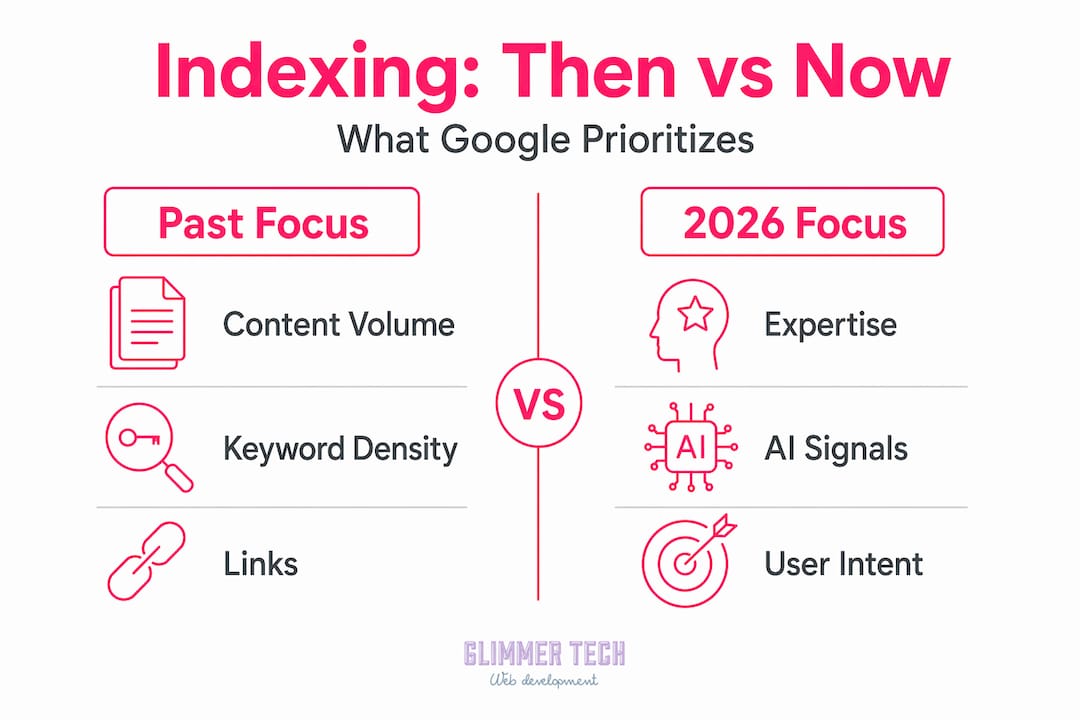
The table below shows what Google prioritized for indexing a few years ago versus what carries the most weight now.
| Indexing factor | Past focus | 2026 focus |
|---|---|---|
| Content volume | More pages meant more coverage | Fewer, higher-quality pages rank better |
| Technical SEO | Correct setup largely guaranteed indexing | Technical setup is the floor, not the ceiling |
| Content type | Text content with keywords | Experience signals and original human insight |
| Mobile optimization | Nice to have | Required for primary indexing |
| Structured data | Helpful for rich results | Critical for AI search agents to extract information |
Search engines now prioritize content that shows human involvement and genuine expertise rather than volume or AI-generated material alone. A 2,000-word blog post written by someone with real experience in the topic will outperform ten thin, auto-generated pages every time.
The rise of AI-powered search also changes what indexing needs to accomplish. Clean HTML with explicit schema markup is now critical for making your content readable not just by Google's traditional crawler, but by AI agents that extract and cite information directly. If your content is buried in JavaScript, rendered only on scroll, or lacks structured data, AI search tools may skip it entirely.
One more thing worth knowing: not all unindexed pages signal a problem. Many page indexing messages in Google Search Console are informational. Google aims to index canonical versions and ignore duplicates or alternate pages. A checkout confirmation page, a staff login page, or a URL parameter variation being unindexed is correct behavior. Do not chase 100% indexing. Chase meaningful indexing.
My take on indexing and small business SEO
I have worked with a lot of small business owners who come in convinced their indexing problem is a technical one. They want to fix meta tags, adjust their robots.txt, or resubmit their sitemap. Sometimes that is the right move. But in my experience, the majority of indexing problems I see are content problems wearing a technical mask.
I have seen well-structured sites with solid technical SEO still sitting in "crawled, currently not indexed" for months. The common thread is always the same: the content does not offer enough that Google hasn't already seen from better sources. A plumber with a service page that says "We fix pipes. Call us." is not going to get indexed over a competitor whose page explains the top five reasons pipes fail in older homes, what signs to watch for, and what the repair process looks like.
What I tell every client is this: fix the technical basics once and fix them right. Then spend 80% of your ongoing effort on content that a real person would want to read. The digital presence fundamentals that drive indexing success are not secret formulas. They are consistency, originality, and relevance.
The 2026 context adds one more layer. Search engines are now selective in a way they were not before. The bar for indexing is higher because there is more content competing for fewer index slots. That is actually good news for small businesses willing to put in the work. Generic competitors get filtered out. Authentic, specific, useful content gets through.
— Annie
How Glimmer Tech can help your site get found
If this article made you realize your site has indexing gaps, you are not alone. Most small business websites we see at Glimmer Tech have at least two or three issues that are quietly blocking their pages from ranking, whether that is poor internal linking, mobile content gaps, or pages that simply do not say enough to earn a spot in Google's index.

Glimmer Tech builds websites with search visibility built in from the start. That means clean code, mobile-first structure, proper schema markup, and content architecture designed for indexing. If you already have a site and want to improve how it performs, the team can audit what is holding you back and fix it. Visit Glimmer Tech's web solutions to see how the work gets done and what results look like for businesses like yours.
FAQ
What does website indexing mean?
Website indexing means a search engine has crawled your page, evaluated its content, and added it to its database so it can appear in search results. Without indexing, your page cannot rank for any search query.
Why is website indexing necessary?
Indexing is necessary because search engines only show results from their stored index. A page that is not indexed is invisible to anyone searching on Google, regardless of how good the content is.
What causes a page to be crawled but not indexed?
The most common cause is low content value. If Google visits a page and finds it thin, duplicate, or not meaningfully different from already-indexed content, it will skip it. This is a content quality decision, not a technical error.
How do I check if my pages are indexed?
Go to Google Search Console and open the "Pages" report under the Indexing section. It will show which pages are indexed, which are not, and the specific reason Google gives for each unindexed page.
Does every page on my site need to be indexed?
No. Pages like thank-you pages, admin logins, duplicate filter URLs, and checkout confirmations should typically carry a noindex tag. Many unindexed pages in Search Console are intentional and correct. Focus on indexing pages that have genuine search value.