

If you run more than one location, one generic website is working against you. A multi location website gives each of your locations its own dedicated page, with specific content, contact details, and SEO signals that help customers in each city find you first. Most small business owners assume a single homepage with a locations list is enough. It rarely is. This article breaks down what a multi location website actually is, why it matters for local SEO, and how to build one that works.
Table of Contents
- Key Takeaways
- What is a multi location website and why it matters
- Benefits of multi location websites for small businesses
- Design features that make multi location sites work
- SEO best practices for building a multi location site
- Real-world examples of multi location sites that deliver
- My take on balancing brand and local identity
- How Glimmer Tech builds multi location websites that rank
- FAQ
Key Takeaways
| Point | Details |
|---|---|
| Definition is simple | A multi location website has dedicated pages for each business location, not just a generic list. |
| Local SEO wins are real | Localized content on location pages delivers a 107% lift in local search rankings versus generic pages. |
| URL structure matters | Subfolder format (yoursite.com/city-name) outperforms subdomains for consolidating SEO authority. |
| Brand plus local content | Consistent branding with local imagery and testimonials builds customer trust and improves conversions. |
| Management needs a system | Centralized CMS tools with local editing rights keep content fresh without brand fragmentation. |
What is a multi location website and why it matters
A multi location website is a single website that contains individual, dedicated pages for each physical business location. Instead of directing all visitors to one generic homepage, each location gets its own page with its own address, phone number, business hours, local content, and calls to action. The structure can take two common forms: subfolders (yourcompany.com/austin) or subdomains (austin.yourcompany.com).
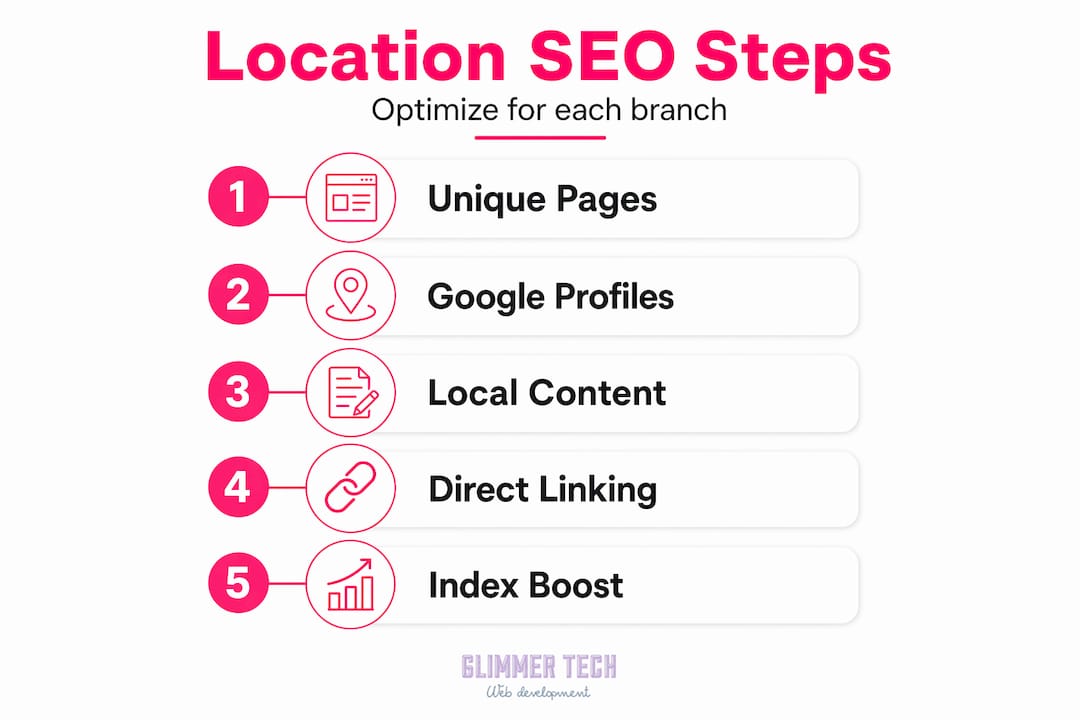

What makes a website multi location is not just the number of pages. It is the intentional design of each page to serve a specific geographic audience. A plumber in Austin and the same plumber in Dallas have different customers searching different terms. Google knows this. A dedicated Austin page that talks about Austin neighborhoods, references local reviews, and lists an Austin phone number signals to Google exactly which location should rank for "plumber in Austin."
This is where the local SEO impact becomes real. Google's local search algorithm rewards relevance, proximity, and prominence. A multi location site addresses all three by:
- Giving each location its own indexed URL
- Providing unique NAP (name, address, phone number) data per page
- Enabling location-specific keywords and content
- Supporting individual Google Business Profile links tied to each location page
Linking unique Google Business Profiles to matching location pages helps Google index each location accurately and improves local pack rankings. Without that connection, your Austin location might compete with your Dallas location for the same search terms, splitting authority instead of multiplying it.
Benefits of multi location websites for small businesses
The advantages of multi location websites go well beyond SEO rankings. Here is what small businesses consistently gain when they make the switch from one generic site to a properly structured multi location setup.
- Stronger local search visibility. Each location page can target city-specific keywords, local service areas, and neighborhood terms. This gives you multiple entry points in Google search instead of one.
- Higher customer trust. When a customer in Phoenix lands on a page that shows your Phoenix address, Phoenix reviews, and a local phone number, they feel they are dealing with a business that actually serves their community.
- Better conversion rates. Localized calls to action ("Book a table in Denver") outperform generic ones ("Book a table") because they meet the customer exactly where they are.
- Easier reputation management per location. Local marketers spend about 17% of their time on reputation management and local signals. Having location-specific pages makes it far easier to display reviews, respond to feedback, and manage the digital reputation of each branch independently.
- Room to scale. Adding a new location means adding a new page. The framework is already in place. You do not need to rebuild your entire website every time you expand.
Pro Tip: Before launching new location pages, audit your existing content for any generic service descriptions that appear word-for-word across multiple pages. Duplicate content is one of the fastest ways to neutralize any local SEO gains you would otherwise earn.
The scalability point deserves more attention. Many small businesses hit a wall when they expand and realize their website cannot support growth without a full redesign. A well-planned multi location site is built with this in mind from day one.
Design features that make multi location sites work
Good design is what separates a multi location site that converts from one that just technically exists. Brand consistency combined with location-specific elements builds trust with both customers and search engines. The trick is knowing which elements to keep uniform and which to localize.
Here is a breakdown of the core design features and how they should be handled:
| Feature | Brand-level control | Location-level control |
|---|---|---|
| Logo and color scheme | Yes, always consistent | No |
| Photography and imagery | Brand style guidelines | Local team, local context |
| Testimonials and reviews | Optional brand showcase | Yes, location-specific |
| Phone number and address | Format only | Unique per location |
| Business hours | Format only | Unique per location |
| Calls to action | Copy guidelines | Localized text and links |
| Schema markup | Template structure | Unique data per location |
Beyond this structure, several specific design elements drive measurable results:
- Store locator or interactive map. A map-based finder lets customers quickly identify the nearest location. It also adds a geographic relevance signal for search engines.
- Click-to-call buttons. On mobile, click-to-call functionality dramatically increases contact rates. This is non-negotiable for service businesses.
- Local schema markup. Adding LocalBusiness schema to each location page tells search engines the precise name, address, phone, and hours. It is invisible to customers but significant for rankings.
- Mobile-first layout. Most local searches happen on phones. If your location pages load slowly or display poorly on mobile, you lose the customer before they ever read your address.
The goal is that a customer landing on any location page should feel like that page was built specifically for their city. Not just a template with a different city name swapped in.
SEO best practices for building a multi location site
Knowing how to create a multi location site correctly from the start saves significant time and protects your search rankings long-term.
URL structure: subfolders win
Subfolder URL structures like yourcompany.com/austin consistently outperform subdomains for local SEO because they consolidate the authority of your main domain across all locations. Subdomains (austin.yourcompany.com) are treated more like separate websites by Google, which splits your domain authority instead of sharing it.
Unique content on every page
This is where most businesses cut corners and pay for it in rankings. Every location page needs genuinely unique content: a local introduction, location-specific services if applicable, real local reviews, and locally relevant imagery. Localized content on location pages produces a 107% improvement in local search rankings compared to pages with generic copied content. That number is not subtle.
Google Business Profile management
Each location needs its own Google Business Profile, linked directly to its corresponding location page on your website. This two-way connection confirms to Google that your website and your business listing represent the same entity at a specific address.
Governance framework for your team
Shared templates with role-based content governance improve maintainability across multiple location sites. In practice, this means your central team controls brand elements, templates, and global SEO settings, while local managers can update hours, add reviews, and post local events. Without this structure, brand fragmentation happens fast.
Pro Tip: If you are planning a website redesign, never change your location page URL structure without 301 redirects in place. Changing URL paths during a redesign is one of the highest SEO risks you face and can wipe out rankings built over years.
For small businesses managing multiple locations without a large IT team, centralized CMS tools that allow local customization without full developer access are the practical solution. Platforms that support multi-tenant architecture let you define what is locked at the brand level and what local managers can edit, which mirrors exactly how good multi location governance should work.
Real-world examples of multi location sites that deliver
The clearest way to understand what a multi location website does in practice is to look at what happens with and without one.
Consider a regional dental practice with five locations. Before building dedicated location pages, all five offices competed for the same generic keywords like "dentist near me." Traffic was diluted. After launching individual location pages with unique content, local reviews, and linked Google Business Profiles, each office began ranking for city-specific searches. Patient bookings from organic search increased per location because visitors were landing on pages designed for their specific city.
Auto shops are another strong example. For businesses in this space, multi-location digital presence requires consistent branding across shops while each location reflects its own community. Shops that add local testimonials and city-specific service descriptions to their location pages routinely see higher click-through rates from Google Maps results than shops pointing all traffic to a generic homepage.
Common pitfalls that proper setup avoids:
- Thin or duplicate location pages that Google ignores
- Missing or mismatched NAP data between the website and Google Business Profile
- No mobile optimization on location pages despite local searches being predominantly mobile
- Store locators that do not link to individual location pages, losing the SEO value of the click
The pattern across successful implementations is consistent. Specific beats generic. Every time.
My take on balancing brand and local identity
I've worked with enough multi-location businesses to know that the hardest part is not the technology. It's the internal debate about control.
Corporate teams want every page to look identical. Local managers want to reflect their own community. Both are right to some degree, and the tension between them is actually where good design decisions get made. What I've learned is that businesses underestimate how much a single piece of locally authentic content, a real photo of the actual storefront, a review from a recognizable neighborhood name, changes how a customer perceives trust.
I've also seen businesses lose significant search traffic overnight because no one told the developer not to change the URL structure during a redesign. The SEO equity built over two years was gone by morning. This is the risk that never gets discussed in the initial project brief, and it should be the first conversation you have before any redesign kicks off.
My advice: define your governance rules before you build anything. Decide what your brand controls and what your local teams control. Put it in writing. It is not glamorous work, but it prevents the content chaos that kills local rankings six months after launch.
— Annie
How Glimmer Tech builds multi location websites that rank
Glimmer Tech designs and builds multi location websites for small businesses that want to compete locally without hiring an internal SEO team. Every site is built with the right URL structure, LocalBusiness schema on each location page, and a CMS setup that gives your local managers editing access without touching anything that affects brand consistency or rankings.
For businesses in industries like construction, where multi-location online presence requires careful SEO and location-specific content, Glimmer Tech has direct experience delivering results. Explore web design and local SEO services built specifically for small businesses managing multiple locations. Reach out to get a custom plan for your site.
FAQ
What is a multi location website?
A multi location website is a single website with dedicated pages for each physical business location, each containing unique content, local contact details, and SEO signals specific to that geographic area.
Is a multi location website necessary for small businesses?
If you serve customers in more than one city or have more than one physical address, yes. One generic homepage cannot rank effectively for location-specific searches across different cities.
What URL structure works best for multi location SEO?
Subfolder format (yourcompany.com/city-name) is generally the stronger choice because it keeps all location pages under your main domain, consolidating your domain authority rather than splitting it across subdomains.
How do you avoid duplicate content across location pages?
Write unique introductions, use local photos, add city-specific testimonials, and reference local service areas on each page. Never copy the same service description word-for-word across multiple location pages.
How many location pages do you need before it matters?
Even two locations benefit from dedicated pages. The SEO and trust advantages apply regardless of scale, and starting with the right structure makes adding future locations straightforward.