

An auto shop website launch is the structured process of planning, building, and publishing a professional site that converts local searchers into booked customers. Done right, it puts your shop in front of drivers at the exact moment they need a mechanic. Tools like Google Search Console, Wix, and Tekmetric each play a distinct role in this process. Shops that skip the planning phase often spend months invisible on Google. This guide walks you through every step, from domain registration to post-launch SEO, so your site works from day one.
What prerequisites are essential before your auto shop website launch?
Before you write a single line of copy or pick a color scheme, you need a solid foundation. The decisions you make here determine how fast your site ranks and how well it converts visitors into customers.
Domain name and hosting are your first two decisions. Choose a domain that includes your city and a service keyword, such as "austintransmissionpro.com" or "denverautofixshop.com." Register it through Namecheap or Google Domains. For hosting, a managed WordPress host like WP Engine or a local-business-friendly platform like Wix handles uptime and security without requiring a systems administrator.

Site goals and architecture come next. Map out what you want visitors to do: call, book online, or request a quote. Every page should point toward one of those three actions. A clean site map for an auto shop typically looks like this:
| Page | Primary Goal |
|---|---|
| Home | Capture attention, direct to booking or call |
| Services | Explain offerings, build trust, drive contact |
| About | Build credibility, humanize the shop |
| Contact | Convert visitor to lead with NAP and form |
| Blog/Local Content | Support local SEO, answer common questions |
Before you build, gather all the content you will need: service descriptions, business hours, your physical address, phone number, and at least five to ten customer photos. Skipping this step forces you to build with placeholder text, which delays launch by weeks. Your digital presence strategy should be clear before a single page goes live.
How to build your auto shop website step by step
Car repair website setup starts with choosing the right platform. Three options dominate for auto shops:
| Platform | Best For | Booking Integration | SEO Control |
|---|---|---|---|
| Wix | DIY owners, fast setup | Built-in app market | Moderate |
| Squarespace | Design-focused shops | Third-party plugins | Moderate |
| Tekmetric | Shops wanting shop management + web | Native scheduling | Strong |
Mobile-first design is not optional. The majority of local searches for auto shops happen on smartphones, and responsive, fast-loading sites convert significantly better in local Google results. Build your layout on a 390px mobile viewport first, then expand to desktop.
Your four core pages each have a job to do:
- Home: A clear headline stating what you do and where, a prominent phone number above the fold, and a single call to action.
- Services: One page per major service category (oil change, brake repair, transmission) with pricing ranges where possible.
- About: A short story about the shop, technician credentials, and any certifications like ASE or AAA Approved.
- Contact: A full NAP (Name, Address, Phone) block, an embedded Google Map, a short contact form, and reCAPTCHA to reduce spam. Search Engine Land confirms that an effective contact page includes trust factors, location-specific content, and a clear call to action. Treat this page as a local landing page, not an afterthought.
Pro Tip: Write all your copy before you open the website builder. Knowing exactly what each page says forces you to think about customer intent first and design second. Shops that do this launch two to three weeks faster.
Online appointment scheduling integration dramatically increases conversion and reduces manual booking errors. Platforms like Tekmetric or a simple Calendly embed give customers a reason to book instead of just browse. Pair scheduling with customer testimonials displayed on the homepage and services pages. Real reviews convert visitors and improve local SEO signals at the same time. Aim for at least six to eight testimonials with the customer's first name and the service they received.
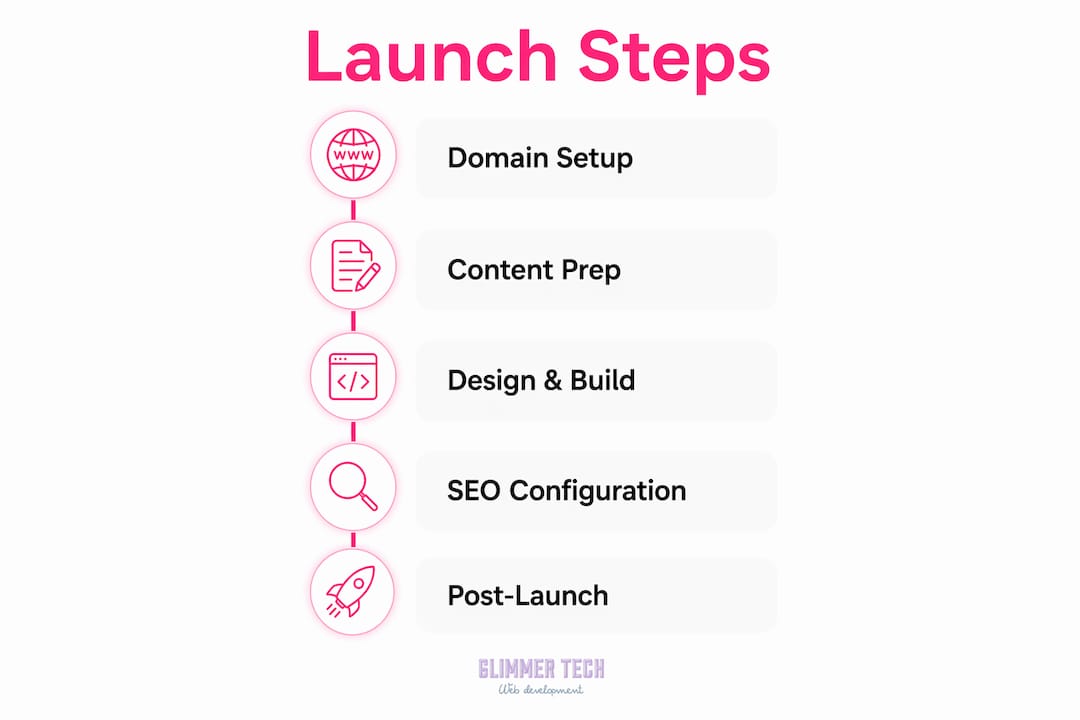
Review the page types that convert best for auto shops before you finalize your site map. Some shops see a 30 to 40 percent lift in leads simply by adding a dedicated "Book Now" landing page separate from the general contact page.
What technical SEO steps get your site indexed by Google?
Getting indexed is not automatic. A new domain can sit undetected for weeks if you skip these steps. Follow this sequence after your site goes live:
- Remove staging noindex tags. The most common launch failure is leaving a noindex directive or robots.txt block active from the staging environment. Check your CMS settings and your robots.txt file at yourdomain.com/robots.txt before anything else.
- Verify your domain in Google Search Console. Add both the domain property and the URL prefix property. Verification proves ownership and unlocks indexing data.
- Generate and submit your sitemap. Most CMS platforms create a sitemap automatically at yourdomain.com/sitemap.xml. If yours does not, use a tool like Yoast SEO or Screaming Frog to generate one. Submit the sitemap URL in Search Console and confirm it returns valid XML and is not blocked by robots.txt.
- Request manual indexing for your homepage. Use the URL Inspection tool in Search Console, paste your homepage URL, and click "Request Indexing." Do this for your homepage only. Google typically indexes new homepages within 3 to 14 days; interior pages may take 2 to 6 weeks depending on content quality and inbound links.
- Set up Google Analytics 4 before launch. Without GA4 and conversion events live at launch, your baseline metrics are permanently lost. Define at least two conversion goals: phone call clicks and form submissions.
- Build internal links from your homepage to every core page. Google relies on crawl paths within your site to discover all relevant URLs. A homepage that links to Services, About, Contact, and your blog gives Google a clear map of your site on the first crawl.
Pro Tip: Do not mass-submit every URL through Search Console's URL Inspection tool. Google treats this as spammy behavior and it can slow indexing. Submit the homepage once, then let the sitemap and internal links do the rest.
Understanding what website indexing means for your business helps set realistic expectations. Most new auto shop sites see their first organic visitors within two to four weeks of a clean launch.
What post-launch optimizations maximize customer conversions?
Launching the site is the start, not the finish. The shops that win local search six months after launch are the ones that treat their website as a living marketing asset.
Google Business Profile optimization is the highest-leverage post-launch task. Choosing the most specific primary category in your profile, such as "Transmission Shop" instead of just "Auto Repair Shop," directly improves ranking relevance for specific service searches. Broad categories reduce your visibility for the searches that matter most.
Here are the post-launch priorities that move the needle:
- Monitor GA4 weekly for traffic sources, top pages, and conversion events. If your "Book Now" page has high traffic but low conversions, the page needs work.
- Publish one local blog post per month targeting a specific service and city combination, such as "brake pad replacement in Phoenix." These posts build topical authority and capture long-tail searches.
- Add live chat to capture visitors who will not call or fill out a form. A tool like live chat integration can increase lead capture by responding to questions in real time.
- Collect and display new reviews consistently. Ask every satisfied customer to leave a Google review before they leave the shop. Fresh reviews signal activity to Google and build trust with new visitors.
- Test site speed monthly using Google PageSpeed Insights. A score below 70 on mobile costs you ranking positions and conversions. Compress images, use a CDN, and minimize JavaScript.
- Add a privacy policy and cookie consent banner if you use GA4 or any tracking pixels. This is a legal requirement in many states and protects your business.
Pro Tip: Set a calendar reminder for the first of every month to check your Google Business Profile for new questions, review responses, and category accuracy. Shops that actively manage their profile rank higher than those that set it and forget it.
Strategies for converting website visitors into booked customers go beyond design. Speed, trust signals, and frictionless booking together determine whether a visitor calls or clicks away.
Key takeaways
A successful auto shop website launch requires domain setup, mobile-first design, technical SEO configuration, and consistent post-launch optimization to drive real customer bookings.
| Point | Details |
|---|---|
| Prepare before you build | Gather all content, define site goals, and map your architecture before opening any website builder. |
| Mobile-first is mandatory | Build for smartphone screens first since most local auto shop searches happen on mobile devices. |
| Fix indexing settings at launch | Remove staging noindex tags and submit your sitemap to Google Search Console on day one. |
| Set up GA4 before going live | Install analytics and define conversion goals before launch or your baseline data is gone permanently. |
| Post-launch work drives results | Monthly blog posts, review collection, and Google Business Profile management compound your visibility over time. |
What I have learned from watching shops launch wrong
I have reviewed dozens of auto shop websites, and the pattern is consistent. Shops spend weeks on logo colors and font choices, then go live with no analytics, a contact form that sends to a spam folder, and a robots.txt file that blocks Google entirely. The site looks fine. It just does not exist on the internet as far as search engines are concerned.
The single biggest mistake is treating the website as a one-time project. A site that launches clean but never gets updated is outranked within six months by a competitor who posts one local blog per month and responds to every Google review. Google rewards activity. A static site is a depreciating asset.
The second mistake is picking a Google Business Profile category that is too broad. I have seen shops categorized as "Car Dealer" because the owner clicked the first suggestion. That one choice costs them ranking positions for every service-specific search in their city.
My honest recommendation: spend 20 percent of your effort on the launch and 80 percent on the first 90 days after. The launch gets you indexed. The first 90 days determine whether you rank. Treat your website the way you treat a new technician. Onboard it properly, give it the right tools, and check in regularly.
— Annie
Ready to launch your auto shop website with Glimmer Tech?
Glimmer Tech builds professional auto shop websites designed to rank locally and convert visitors into booked customers from day one.
Every site Glimmer Tech delivers includes mobile-first design, online booking integration, Google Search Console setup, and on-page SEO built in from the start. The team handles the technical configuration so you focus on running your shop. With a 98% client satisfaction rate and a track record of results-driven builds, Glimmer Tech removes the guesswork from launching a site that actually performs. Explore professional web design options tailored for auto shops and get a quote today.
FAQ
What is the first step in an auto shop website launch?
Register a domain name that includes your city and a service keyword, then choose a hosting platform before building any pages. Planning your site architecture and gathering all content before you start building saves weeks of rework.
How long does it take Google to index a new auto shop website?
Google typically indexes a new homepage within 3 to 14 days after you submit a sitemap and request indexing through Google Search Console. Interior pages can take 2 to 6 weeks depending on content quality and internal linking.
What pages does an auto shop website need?
At minimum, an auto shop site needs a Home page, a Services page, an About page, and a Contact page with full NAP details and a booking option. Adding individual service pages for high-value repairs like transmission work or brake service improves local SEO significantly.
Why is mobile design critical for a mechanic site?
Most local searches for auto repair happen on smartphones, and Google uses mobile page experience as a ranking factor. A site that loads slowly or displays poorly on mobile loses both rankings and customer conversions.
How do I improve my auto shop website after launch?
Publish local service blog posts monthly, collect Google reviews consistently, monitor GA4 for conversion data, and keep your Google Business Profile updated with the most specific service category available.